
Next-generation communication
Ris-Biz
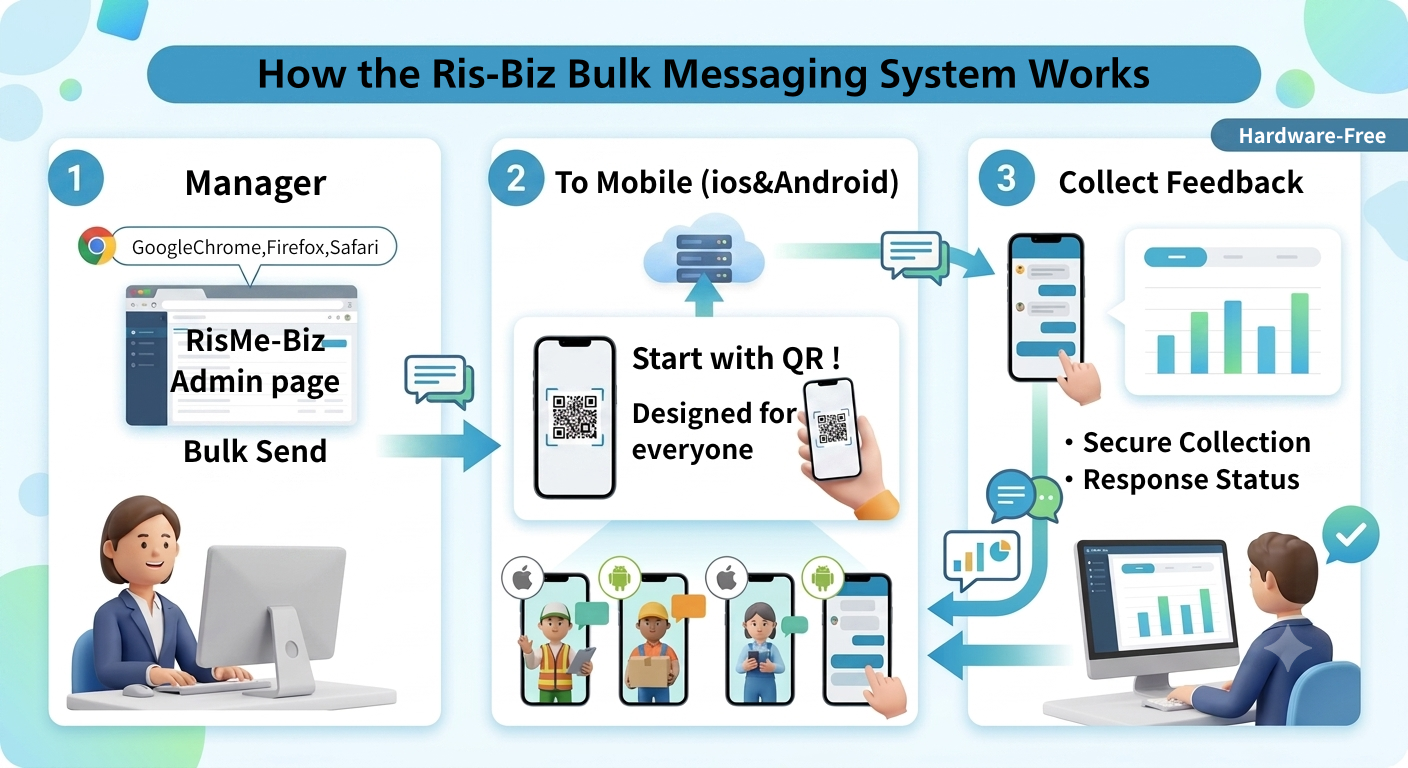

❓ What is Ris-Biz?
Ris-Biz is the business version of the voice messenger "RisTalk".
Organizational managers can connect "smartly" with both employees and customers.
A next-generation communication platform.
Within the company, rapid survey data collection visualizes on-the-ground feedback in real time, supporting improved employee engagement and speedy decision-making. Furthermore, smooth clock-out and labor management significantly reduces the burden on back-office staff.
In customer support, we also gather real customer feedback through seamless and rapid surveys and opinion collection.
Quickly identify needs. Based on Listoke's technology, we integrate internal and external communication to improve overall organizational productivity.
We are a powerful business partner that simultaneously maximizes customer satisfaction (CS).
🎯 What changes when you install Ris-Biz
Ris-Biz eliminates four common problems associated with paper time cards and existing attendance software: forgetting to clock in, input errors, the hassle of data compilation, and employees feeling "monitored." It reduces the burden on both organizational administrators and employees.
- No more forgetting to clock in or making mistakes.Slide-to-tap/long-press for zero accidental operation. Automatically ends after the maximum measurement time, and weekly reminders prevent you from forgetting to press the button.
- Reduce the time spent on data aggregation and reporting.The app automatically handles the aggregation. It displays color-coded graphs showing the period, total, weather, and weekends, and can be shared with a single tap as a CSV file, image, or on an internal whiteboard.
- Easy for employees to acceptThe clear separation of company and personal records helps to reduce the feeling of being monitored. GPS tracking is only performed at the moment of clocking in and out, and does not track continuously.
- No need to distribute new apps.Employees already using RisTalk simply need to turn on the "Optional Features." New employees can also be added securely using an invitation email and verification code.
- Adaptable to industry and work style rules.You can decide on a company-specific approach to handling clock-ins outside of contracted hours and geofencing range determination. It also supports work styles that combine on-site, remote, and on-site work.
Suitable organizations:Companies with multiple locations, on-site work, direct commutes, and remote work; organizations where existing attendance software doesn't fit in with the workplace and have reverted to paper-based systems; and managers struggling with fraudulent or incomplete time clock entries.
🕒 Two records: company and personal
When you turn on Ris-Biz in the "Optional Features" section on the home screen, a mini-window (RisBizWindow) will appear below the tags and buttons. You can switch between recordings using the dropdown menu at the top, and change the display name or revert to the default using the ✏️ button.
- Company records (work)One per associated company. Settings are managed by the company's WordPress plugin, and break times, measurement conditions, etc. cannot be edited on the app side (🔒)
- My personal records (private)There is one initially, and you can add as many as you like. You can also freely delete added items. You can also change the display name.
🔒 Time stamping button that prevents accidental operation
There are three states: OFF → Working → Break. The buttons are Start / End / Break / Restart, and I always keep the End button on the top row to keep its position fixed.
- Normal displayThe stamp is only applied when the slider has slid all the way to the right.
- Slim displayPress and hold to clock in (0.4 seconds, except for the company's End time, which takes 0.7 seconds)
- BreakYou can only select the length of your break by pressing this button. You cannot edit it if the company has already decided it (🔒).
- You can confirm that Start, Break, and End have been successfully completed with a sound effect (kako.mp3) (according to the transmission sound settings).
The status is displayed using color, icons, and in English plus the local language. The time is shown with the time difference at the time of pressing (e.g., "08:30 (UTC+9)"), and the total for the day is counted up every second.
⏰ Automatic time clocking and terminal notifications
Even if you forget to clock in, the system will automatically close your time. You'll also receive a notification on your device even if the app is closed.
- Automatic restartWork will automatically resume once the break period is over.
- Automatic EndThe system automatically stops after the maximum measurement time (default 8 hours) has elapsed. Company records will only automatically end when the company has decided to do so.
- The time stamped will be recorded at the exact moment it passes.
- ReminderYou can select the time and day of the week for each Start/End/Break/Restart event and schedule them as weekly device notifications.
Work hours type:Companies that "do not count clock-ins made outside of contracted hours" will inform employees that "clock-ins will be made at 9:00 as per the contract."
📊 Visualization of data aggregation, footprints, and weather
📊 Click the button to open the summary. The period can be Day / Week / Month / Year, with Month being the default. It displays a total, a daily list, and a bar graph, and the bar graph will also show colors for weather and weekends.
- View footprints: Opens the map. The monitoring activity data will be used on your device and not sent to the company (the server-side activity data disappears after 24 hours, so you need to open the app within 24 hours of closing).
- Weather and temperature: This will be added to the start time stamp. Instead of GPS, the weather for a representative city in the device's time zone will be obtained from MET Norway (you can choose from 418 cities worldwide; this will not be sent to the company).
- From the menu in the upper right corner, you can select "Save as photo," "Send to blackboard," "Send footprint image to blackboard," "Copy summary text," and "Save as CSV."
🛡️ Privacy-first design
Company time clocking does not involve any communication with the company until the employee gives their consent. Even after account linking, only necessary information is transmitted briefly via the gateway.
- Authentication to the company is done using a token issued by the gateway that is valid for only 10 minutes. Firebase ID tokens are not sent to the company.
- GPSThis only takes a single record at the moment you press the button, and only if requested by the company or if you have enabled the setting in your own records. It does not track continuously (the company determines the geofence range of your work location).
- Your records are saved only on your device. Your IP address is not recorded. They are not deleted even when you log out (they are deleted when you delete your account).
- When out of rangeThe system stores the time stamps on the terminal and displays "N unsent records." Once the signal is restored, the records are sent in chronological order. Records that the company does not accept (more than 7 days old, outside the geofence, etc.) are discarded and the employee is notified.
🏢 The process for implementing it in your company
Ris-Biz uses a company management screen and a smartphone app for members as a set. It won't work just by distributing the app to members; first, the company must be registered and linked to the system, so that "this company is responsible for viewing the attendance records of these individuals."
- Inquiry/Organization RegistrationApply to an agent or the Ris-Biz secretariat and register your company. To prevent impersonation, you cannot use the service until approval from the secretariat is complete.
- Admin accountOnly one per company. If you want to make an account that is already using RisTalk the administrator, you must obtain the user's consent before registering.
- Member invitationWe will send you an invitation via email from the administration panel. Simply clicking the link in the invitation email will not log you in; you must first enter a verification code sent to your email address to gain access, thus preventing misuse of forwarded links.
- Plan-based limit managementThe available features, number of members, and expiration date are determined by the plan. The limits are protected by the app, so they cannot be exceeded even by modifying the management screen.
⚙️ Attendance rules determined by the company
The following settings can be configured from the admin panel and cannot be edited within the app (🔒). This allows you to directly reflect your company's rules.
- Options for break lengthReplace the default 10/15/30/60 minutes with your company's rules.
- Maximum measurement timeDefault time: 8 hours. You can choose to have it automatically end after that time, or to end it manually.
- Types of working hours: Handling of clock-ins outside of contracted hours. For example, if you set it to "Do not count clock-ins outside of contracted hours," the app will display a message saying, "Your clock-in will be at 9:00 as per the contract."
- Geofence: Work location range determination. Clock-ins outside this range will not be accepted by the company.
- Is GPS necessary?: Whether to require location information when clocking in or out.
Points that are easy to communicate to members:Only "company records" are sent to the company. Time cards created by members for their own use, and monitoring activity logs, are not sent to the company. Even company clock-ins do not communicate with the company until the individual "validates" them.